Clear Starting Points
Initial Concept
The goal was to create a landing page showcasing all my projects, focusing on process and results through visuals like photos and videos. I wanted to demonstrate both my creative and technical abilities through an engaging, single-page design.
Explored three design directions: Minimalist, Creative, and Professional. Selected the Creative Design approach for its ability to highlight my artistic and technical skills with engaging visuals and interactivity.
Inspiration Sources
- Competitor portfolios and research
- Single-page design patterns
- Dynamic features from portfolios like Artur Bień's and Laysan Lessy's
- Interactive visual elements
Design Goals
- Clear navigation structure
- Focus on creative and technical elements
- Engaging visuals and interactivity
- Responsive design for all devices
Reasons for Iteration
Stakeholder Feedback
Simplify contact section, emphasize personal connection, use years instead of percentages
Peer & Mentor Feedback
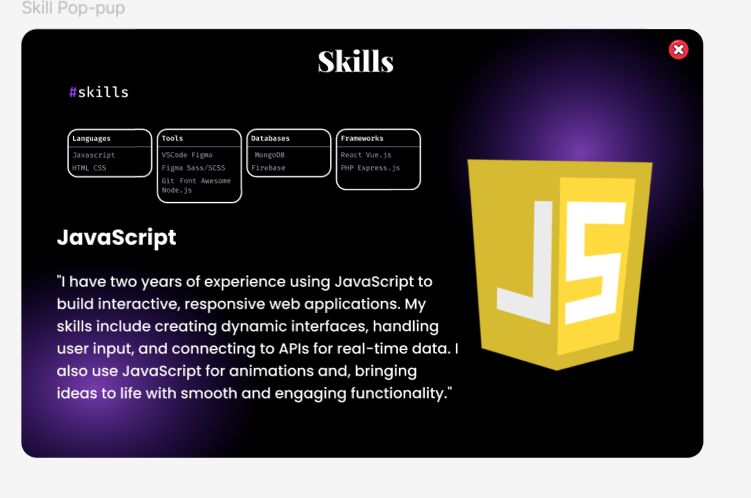
Improve case studies with challenges/solutions/outcomes, add interactive skill popups
Competitive Research
Focus on dynamic features, interactive visuals, ensure responsive accessibility
Key Feedback Points
- Contact Section: Replace the form with footer links to LinkedIn and email for simplicity
- About Me: Expand personal connection by adding more personality and values
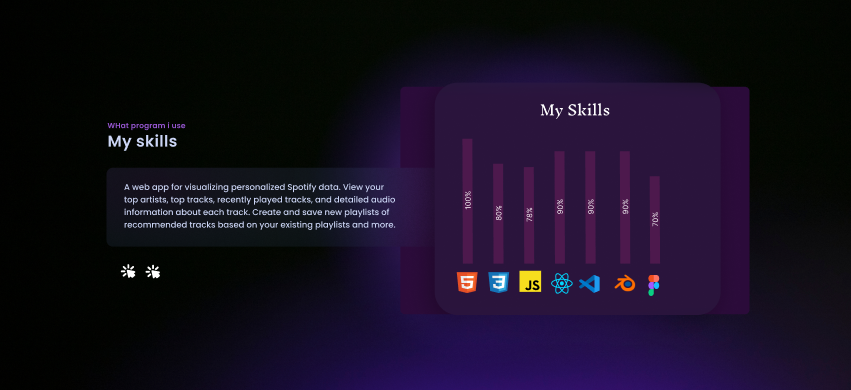
- Skills Section: Use years of experience instead of percentage indicators for clarity
- Case Studies: Detail challenges, solutions, and outcomes for each project
- Interactivity: Replace static designs with interactive pop-ups for engagement
Before and After Iterations
Skills Section Iteration
Before
Static table with percentage indicators. No context about actual experience or capabilities.
After
Interactive pop-ups displaying skill names, years of experience, and concise explanations of capabilities.
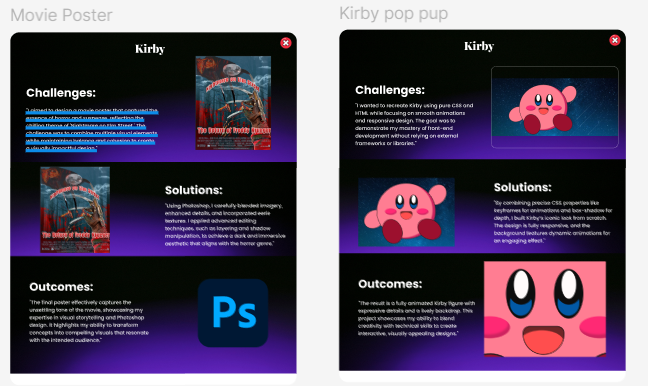
Case Studies Section Iteration
Before
Brief descriptions without structured narratives. No clear story of the design process.
After
Detailed challenges, solutions, and outcomes for each project with supporting visuals.
Contact Section Iteration
Before
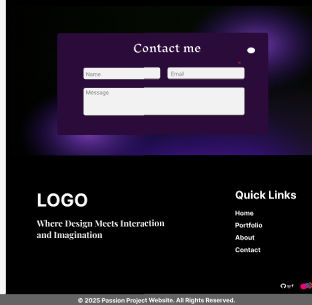
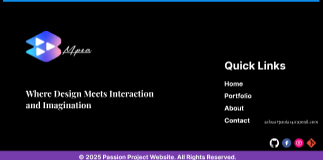
A standalone contact page with a form that users rarely completed.
After
Direct LinkedIn and email links in the footer for quick, easy contact.
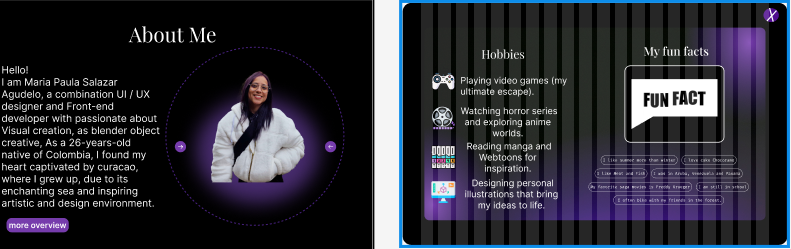
About Me Section Iteration
Before
Minimal personal information. No personality or connection with visitors.
After
Expanded content with hobbies popup, fun facts, and insights into personality and values.
Wireframes & Layout Planning
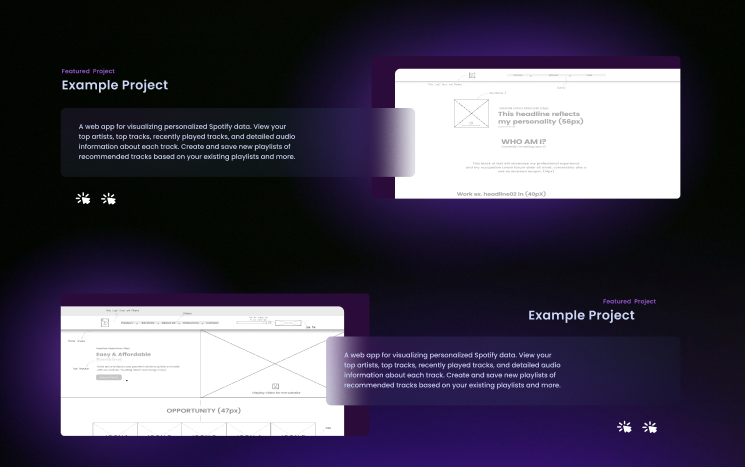
Design Annotations
Low-fidelity and high-fidelity wireframes showing the evolution of project layouts. Includes detailed annotations for spacing, typography sizes, and visual hierarchy planning.
Concept Design - Doctor Demand App
Healthcare App Case Study
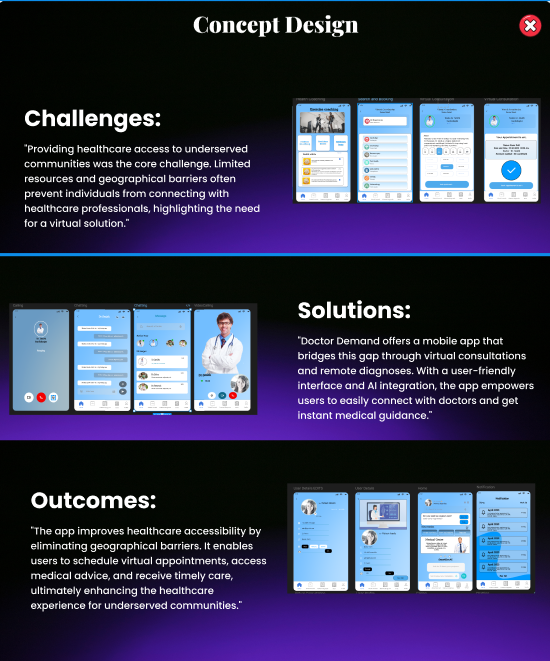
A complete concept design demonstrating the Challenges → Solutions → Outcomes framework that I applied to all my case studies. "Doctor Demand" bridges healthcare access gaps through virtual consultations.
Challenges
"Providing healthcare access to underserved communities was the core challenge. Limited resources and geographical barriers often prevent individuals from connecting with healthcare professionals."
Solutions
"Doctor Demand offers a mobile app that bridges this gap through virtual consultations and remote diagnoses. With a user-friendly interface and AI integration, the app empowers users to easily connect with doctors."
Outcomes
"The app improves healthcare accessibility by eliminating geographical barriers. It enables users to schedule virtual appointments, access medical advice, and receive timely care, ultimately enhancing the healthcare experience for underserved communities."
Validation of Iterations
Triangulation Strategy
I validated my design decisions through multiple feedback sources to ensure the iterations truly improved the user experience:
- HR Feedback: Highlighted the importance of storytelling and simple navigation for recruiters reviewing portfolios
- Competitive Analysis: Confirmed the effectiveness of interactive elements and engaging visuals in standing out
- UX Research: Supported responsive and accessible design principles for all device types
User Testing Results
- Feedback emphasized removing unnecessary sections like the full contact page
- Stakeholders appreciated the added personal connection in "About Me"
- Interactive skills popup received positive feedback
Peer Feedback
- Suggested enhancing case studies with more in-depth process details
- Recommended using interactive elements to showcase technical skills
- Validated the creative design direction choice
Tools & Design Process
Design Stack
Explore More Projects
Check out my other design and development work!